Data entry clerk resume example
A complete resume for a data entry clerk in insurance and medical billing, plus summaries, bullet points, skills and how to show your typing speed.
What hiring managers look for
Office supervisors hiring for data entry look for two numbers before anything else: how fast you type (words per minute and keystrokes per hour on a 10-key) and how accurate you are. After that they want the kinds of records you've worked with, such as claims, invoices, orders or patient charts, the software you've used, how many records you complete a day and whether you can be trusted with private information.
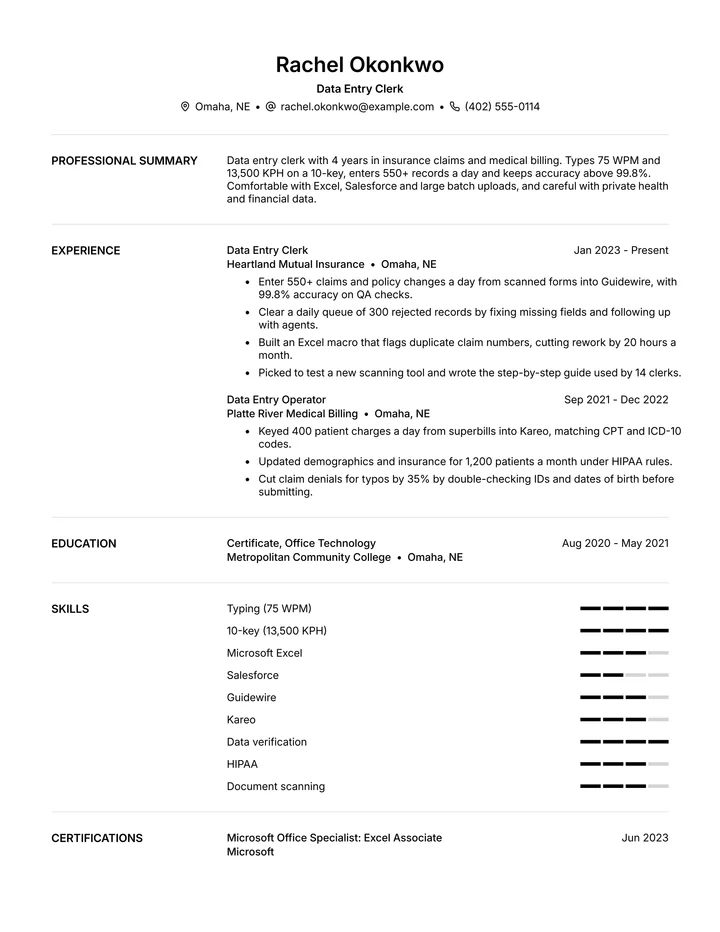
This example belongs to a clerk with four years at an insurance company and a medical billing office. Speed and accuracy appear in the summary and the skills, every bullet carries a volume or error rate, and the systems are listed by name. Remote data entry workers, order entry clerks, records clerks and typists can keep the outline and put in their own figures.
Data entry clerk resume summary examples
Mid-level, 4 years
Data entry clerk with 4 years in insurance claims and medical billing. Types 75 WPM and 13,500 KPH on a 10-key, enters 550+ records a day and keeps accuracy above 99.8%. Comfortable with Excel, Salesforce and large batch uploads, and careful with private health and financial data.
Beginner
Detail-oriented job seeker with 60 WPM typing and strong Excel skills, looking for a first data entry role. Kept inventory records for a 2-person online shop and entered 200 orders a week with no shipping mix-ups.
Medical records
Medical records clerk with 5 years at a 200-bed hospital, scanning, indexing and entering 800 documents a day into Epic. Knows HIPAA rules, medical terms and release-of-information steps.
Remote clerk
Remote data entry specialist with 3 years of contract work for e-commerce and logistics companies. Processes 1,000 product listings a week in Shopify and Google Sheets, meets every deadline and works well with teams across time zones.
Data entry clerk resume bullet points
Strong bullets start with what you did and end with what changed. Borrow the pattern, then use your own numbers.
- Entered and checked 12,000 invoices a quarter into SAP with fewer than 10 errors.
- Converted 15 years of paper files to digital records, scanning and indexing 40,000 pages.
- Raised my 10-key speed from 9,000 to 13,500 KPH in a year by practicing daily.
- Cleaned a 50,000-row customer list in Excel, removing 6,000 duplicates before a CRM move.
- Kept a 99.9% accuracy score on monthly audits for 18 straight months.
- Processed 250 shipping orders a day in NetSuite during peak season with no missed cutoffs.
- Trained 5 temp workers on keying rules and quality checks during a backlog project.
- Wrote a field-by-field checklist that reduced new-hire errors by 40% in their first month.
Skills for a data entry clerk resume
Skills job postings ask for
- Fast, accurate typing
- 10-key data entry
- Microsoft Excel and Google Sheets
- Data verification and cleanup
- Database and CRM entry (Salesforce, HubSpot)
- ERP systems (SAP, NetSuite)
- Scanning and indexing
- Medical or insurance codes
- Confidential records handling
- Microsoft Word and Outlook
Skills to show in your bullets
- Attention to detail
- Focus
- Time management
- Reliability
- Working on your own
List the skills a posting names in its own words, and only the ones you can talk about in an interview. Qualities like these read best as results in your bullets, not as a list.
Tips for writing a data entry clerk resume
- 1
Lead with your speed and accuracy
Put your WPM, your 10-key KPH and your accuracy rate in your summary. Many employers test both, so use the scores from a recent test.
- 2
Say what kind of data you've entered
Claims, invoices, orders, patient charts and product listings each have their own rules. Naming yours shows you'll learn the next job quickly.
- 3
Give daily or weekly volume
"550 records a day" or "12,000 invoices a quarter" shows how much work you can carry. Add accuracy right after it.
- 4
Show you can do more than type
A macro, a checklist, a cleanup project or training new clerks shows initiative, and it's how data entry clerks move into analyst and admin roles.
How to show your typing speed
Speed claims are only believable with a measure behind them. Take a timed typing test and a 10-key test, write the results the way employers do, and keep the test record in case they ask. Retest every year or two as you improve.
- Typing speed in words per minute, such as "75 WPM"
- 10-key speed in keystrokes per hour, such as "13,500 KPH"
- Accuracy as a percent, from tests or quality audits
- Records or documents completed per day
- Excel or Office certifications, such as Microsoft Office Specialist
Make it yours

Talk instead of writing
Writing about yourself is hard. Talking is easy. A 25-minute call with the resume expert gets you a resume built from your best work.

Fit it to every job
Paste a job posting and get every line tailored to it, in the words the employer uses.

Know it gets read
See what an applicant tracking system reads in your resume, and what to fix, before you apply.
A cover letter to match
Get a cover letter written from your resume for the job you want, ready to send with it.