IT support specialist resume example
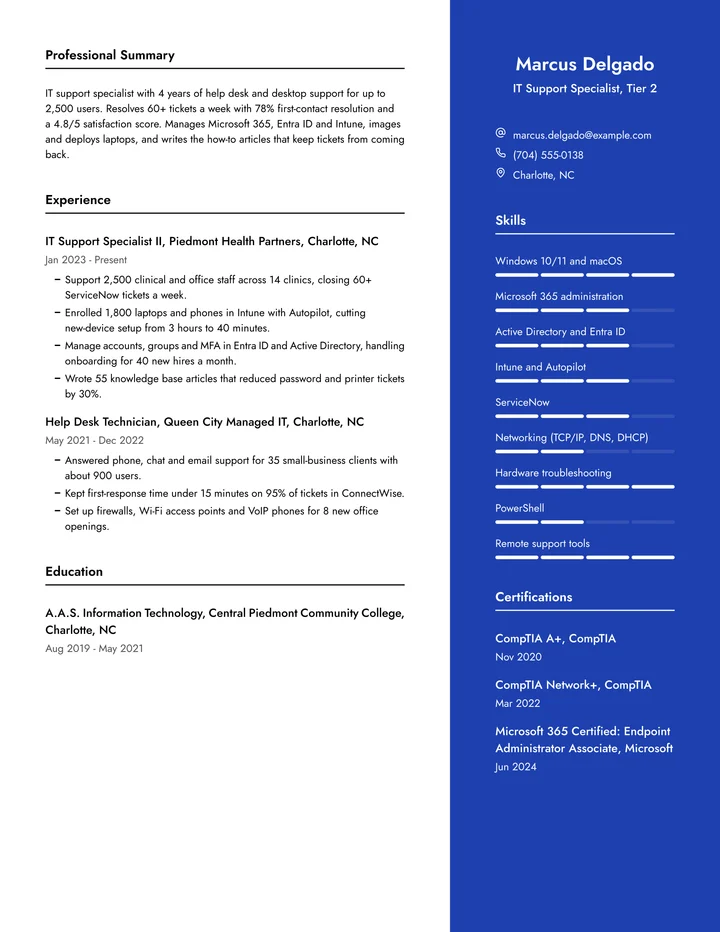
A complete resume for a Tier 2 IT support specialist, plus summaries, bullet points, skills and the certifications to list.
What hiring managers look for
IT managers hiring for support want proof you can fix problems fast and keep people working. They look for the systems you support (Windows, macOS, Microsoft 365, Active Directory or Entra ID, Intune, networking basics), your ticketing tool, and numbers like tickets closed a week, first-contact resolution and satisfaction scores. Certifications such as CompTIA A+, Network+ or a Microsoft associate help you pass the first screen.
This example belongs to a Tier 2 specialist with four years at a hospital system and a managed service provider. The layout keeps certifications and the tool stack easy to scan and gives each job a clear count of users and devices. Help desk technicians, desktop support techs and junior system administrators can use the same outline.
IT support specialist resume summary examples
Mid-level, 4 years
IT support specialist with 4 years of help desk and desktop support for up to 2,500 users. Resolves 60+ tickets a week with 78% first-contact resolution and a 4.8/5 satisfaction score. Manages Microsoft 365, Entra ID and Intune, images and deploys laptops, and writes the how-to articles that keep tickets from coming back.
First help desk job
CompTIA A+ certified IT student with a home lab running Windows Server, Active Directory and a pfSense firewall. Volunteered as the go-to tech for a 30-person church office, setting up laptops, printers and Microsoft 365. Patient on the phone and quick to learn new tools.
Desktop support lead
Desktop support lead with 7 years in higher education, running a team of 5 technicians and 3,000 devices. Built the imaging and patching process that keeps 98% of machines current and led the move from on-premises Exchange to Microsoft 365.
Changing careers
Former retail store manager who earned CompTIA A+ and Network+ and spent a year volunteering in IT support for a nonprofit. Brings years of calming frustrated customers, plus hands-on skill with Windows, Microsoft 365 and basic networking.
IT support specialist resume bullet points
Strong bullets start with what you did and end with what changed. Borrow the pattern, then use your own numbers.
- Rolled out a self-service password reset tool that removed 400 tickets a month from the help desk queue.
- Diagnosed and replaced failing hard drives, screens and batteries on 300+ laptops a year, keeping repair costs in-house.
- Led the Windows 11 upgrade for 1,100 computers with no lost user data.
- Raised the team's satisfaction score from 4.2 to 4.7 by introducing follow-up emails on every closed ticket.
- Wrote PowerShell scripts that automated account setup, saving the team 6 hours a week.
- Mapped and labeled 220 network drops across two floors, cutting time to trace a dead port to minutes.
- Trained 150 staff on spotting phishing emails; reported click rates in tests dropped from 18% to 4%.
- Tracked and audited 2,000 assets in Snipe-IT, finding $45,000 in unused software licenses.
Skills for an IT support specialist resume
Skills job postings ask for
- Windows and macOS support
- Microsoft 365 and Exchange Online
- Active Directory and Entra ID
- Intune, Jamf or SCCM
- Ticketing systems (ServiceNow, Jira, Zendesk)
- Networking basics (TCP/IP, DNS, DHCP, VPN)
- Hardware repair and imaging
- Remote desktop tools
- PowerShell scripting
- Printers and peripherals
- Security basics and MFA
Skills to show in your bullets
- Patience with frustrated users
- Explaining tech in plain words
- Prioritizing a busy queue
- Documentation
- Customer service
List the skills a posting names in its own words, and only the ones you can talk about in an interview. Qualities like these read best as results in your bullets, not as a list.
Tips for writing an IT support specialist resume
- 1
Put ticket numbers in your bullets
Tickets a week, first-contact resolution, response time and satisfaction scores are how IT managers judge support work. A few of them make your resume far stronger than a list of duties.
- 2
Say how many users and devices
"2,500 users across 14 clinics" shows the size of the environment you can handle. Include it for every job, even if the number is small.
- 3
Show the projects beyond the queue
Device rollouts, upgrades, scripts and knowledge base articles show you can fix the cause of problems, not just the tickets. Those are what get you promoted to Tier 2 or system administration.
- 4
List the exact tools
Write Intune, Jamf, ServiceNow or ConnectWise rather than "device management" or "ticketing software." Recruiters search for the tool names in the posting.
Certifications that help in IT support
Certifications matter more in IT support than in most tech jobs, because they show baseline skills before you have years of experience. List each with the issuer and the year.
- CompTIA A+ (the most requested for help desk roles)
- CompTIA Network+ and Security+
- Google IT Support Professional Certificate
- Microsoft 365 Endpoint Administrator or Modern Desktop Administrator
- ITIL 4 Foundation
- Apple Certified Support Professional, for Mac-heavy offices
Make it yours

Talk instead of writing
Writing about yourself is hard. Talking is easy. A 25-minute call with the resume expert gets you a resume built from your best work.

Fit it to every job
Paste a job posting and get every line tailored to it, in the words the employer uses.

Know it gets read
See what an applicant tracking system reads in your resume, and what to fix, before you apply.

A cover letter to match
Get a cover letter written from your resume for the job you want, ready to send with it.